
wpdt_log() writes custom entries to your WordPress debug log through WP Debug Toolkit’s (WPDT) internal logging pipeline. Use it instead of PHP’s native error_log() when you need a searchable [Debug Toolkit] [context] prefix, automatic JSON serialization for arrays and objects, and a global verbosity threshold that filters messages by severity before writing.
wpdt_log()wpdt_log() is a PHP helper function defined in includes/utils.php that routes custom messages through the same logging pipeline WP Debug Toolkit uses internally. Pass it a message, an optional context identifier, and an optional severity level, and it writes a formatted [Debug Toolkit] [context] entry to your WordPress debug log.
PHP’s native error_log() produces flat, unstructured output with no context labels, no severity filtering, and no automatic data serialization. Every call lands in debug.log indistinguishable from framework noise.
wpdt_log() adds all three: a searchable prefix that isolates your entries in the Error Log Viewer, a global verbosity threshold that suppresses low-priority calls on production, and wp_json_encode handling for arrays and objects so you pass data structures directly without manual conversion.
wpdt_log() is the only WordPress logging function that writes structured, tagged entries directly into the same stream your Viewer App already monitors. Custom entries appear alongside WordPress errors in the same filterable interface, with no separate log to check.
wpdt_log() Workswpdt_log() resolves the $level string to an internal priority constant, serializes non-scalar values, and delegates to \DebugToolkit\Error_Handler::log(), the same method WPDT’s own services use internally.
WP_DEBUG is false and no override is configured, that threshold defaults to error, and WPDT silently drops debug, info, and warning calls.wp_json_encode before writing, with print_r as a fallback if encoding fails. Pass any data structure directly without the need for any manual conversion.wpdt_log() to write entries. Without it, the function is undefined. Wrap calls in if ( function_exists( 'wpdt_log' ) ) to prevent fatal errors on sites without WPDT.WP_DEBUG_LOG must be enabled and the log file must be writable. wpdt_log() delegates to PHP’s error_log(), which writes to wherever WordPress routes logging. With WP_DEBUG_LOG set to true, that destination is typically wp-content/debug.log.In any distributable plugin or theme, wrap wpdt_log() calls in function_exists() before calling the function. When WPDT is not active, the function is undefined and the block is skipped with no errors and no overhead.
php
// Safe to ship in any plugin or theme.
// When WPDT is active, the message is logged.
// When WPDT is absent, this block is silently skipped -- no errors, no overhead.
if ( function_exists( 'wpdt_log' ) ) {
    wpdt_log( 'Cache cleared', 'my-plugin', 'info' );
}wpdt_log() With the Appropriate Argumentsphp
// Function signature
wpdt_log( $message, string $context = 'custom', string $level = 'debug' ): void
// Log a simple message with an explicit context and level
wpdt_log( 'Payment processed', 'checkout', 'info' );
// Log structured data -- WPDT JSON-encodes arrays and objects automatically
// Output: [Debug Toolkit] [data-export] {"user_id":42,"action":"export","rows":1500}
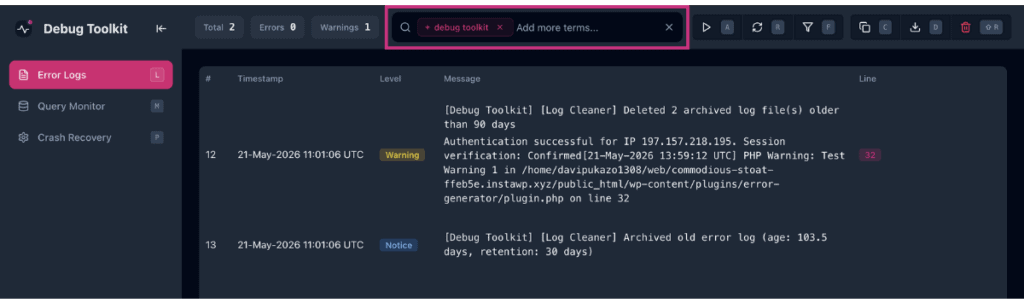
wpdt_log( [ 'user_id' => 42, 'action' => 'export', 'rows' => 1500 ], 'data-export', 'info' );✅ What You Should See: Entries appear in the Error Log Viewer as [Debug Toolkit] [context] message. Search for +Debug Toolkit or +[your-context-string] in the viewer’s search bar to isolate them from native PHP errors. The viewer’s Custom Code source filter targets file paths embedded in standard PHP error lines, not the wpdt_log() $context string. Use the + operator to find custom entries.
WPDT resolves the global verbosity threshold using this precedence:
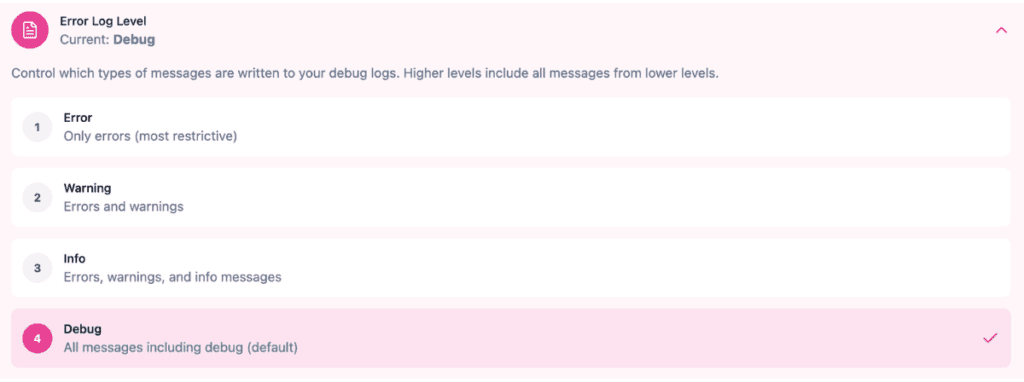
DBTK_LOG_LEVEL constant in wp-config.php (highest priority)WP_DEBUG is true: threshold is debugOn a production site with WP_DEBUG false and no override, WPDT silently drops all calls at ‘debug’, ‘info’, and ‘warning’. Only ‘error’ calls reach the log.
Navigate to WP Debug Toolkit › Settings › Viewer Settings and set Error Log Level to the lowest severity you want written. Changes take effect immediately.
For staging environments, define the constant in wp-config.php. This setting takes precedence over the admin UI.
php
// wp-config.php
// Accepted values: debug | info | warning | error
// Takes precedence over the Error Log Level admin setting.
define( 'DBTK_LOG_LEVEL', 'warning' ); // Write warning and error; silently drop debug and info
For remote or programmatic control, send an authenticated PUT request to /wp-json/wpdebugtoolkit/v1/log-level with a level parameter. Requires admin permissions. GET the same endpoint to read the current level.
wp dbtk log read --search does not find wpdt_log() entries. The CLI reader runs every line through a parser that requires WordPress-formatted error lines matching [timestamp] PHP <level>: message. Custom [Debug Toolkit] [context] message lines do not match that pattern and are discarded before the search filter runs. Searching for +Debug Toolkit via wp dbtk log read returns no results regardless of what is in the log file.
The Error Log Viewer is the supported way to search custom log entries. Open the viewer and search +Debug Toolkit or +[your-context-string] to isolate them from native PHP errors.
If you need to access custom entries from the command line, use wp dbtk log stats to get the resolved log path, then search the file directly:
bash

# Get the path WPDT is reading from

wp dbtk log stats

# Then grep the resolved path directly

grep "\[Debug Toolkit\]" /path/from/stats/output/debug.log

# Narrow to a specific context

grep "\[checkout\]" /path/from/stats/output/debug.log

# Narrow to a specific context

grep "\[checkout\]" /path/from/stats/output/debug.logdbtk_log_error() InsteadUse wpdt_log() for strings, data structures, operational messages, and diagnostic traces. Use dbtk_log_error() when you are handling a caught exception. It accepts an \Exception object directly and routes it through Error_Handler::log_exception(), which adds file path, line number, and stack trace context when WP_DEBUG is on.
php
try {
    $response = $api->call( $payload );
} catch ( \Exception $e ) {
    // dbtk_log_error() adds file, line, and trace context when WP_DEBUG is on.
    dbtk_log_error( $e, 'checkout' );
}

// For non-exception failures, wpdt_log() is the correct call.
wpdt_log( 'API returned unexpected status: ' . $status_code, 'checkout', 'error' );
Never call \DebugToolkit\Error_Handler::log() directly from third-party plugin or theme code. It is an internal method with no stability guarantee. wpdt_log() is the stable public API.
API comparison:
| Method | Context | Levels | Structured Data | Exception Support | Requires WPDT |
|---|---|---|---|---|---|
wpdt_log() | Yes | Yes | Auto JSON | No | Yes |
dbtk_log_error() | Yes | Yes | Manual | Yes | Yes |
error_log() | No | No | Manual | No | No |
Error_Handler::log() | Yes | Yes | Manual | No | Yes |
Use error_log() in code that must run on any WordPress environment without WPDT: mu-plugins that load before WPDT, standalone scripts, or shared libraries. The two are not mutually exclusive. wpdt_log() calls error_log() internally.
wpdt_log() Calls Produce No Entries in the Log ViewerLikely cause: The global log level threshold filters out the call’s $level. On production with WP_DEBUG false and no explicit override, WPDT defaults to error-only and silently drops debug, info, and warning calls.
Fix: Navigate to WP Debug Toolkit › Settings › Viewer Settings and raise Error Log Level, or define DBTK_LOG_LEVEL in wp-config.php. To get entries through without changing the global threshold, change the call’s $level argument to ‘error’.
wpdt_log() Entries Do Not Appear in the Viewer’s Custom Code Source FilterLikely cause: The viewer’s Custom Code filter targets file paths embedded in standard PHP error lines, not the wpdt_log() $context string. Custom [Debug Toolkit] entries do not match this filter bucket.
Fix: Search for +Debug Toolkit or +[your-context-string] in the viewer’s search bar to locate custom entries directly.
wpdt_log()Likely cause: WP Debug Toolkit is not active, or the call executes before the plugin loads.
Fix: Confirm WP Debug Toolkit is active in wp-admin › Plugins, then wrap the call in if ( function_exists( 'wpdt_log' ) ) to prevent this error on any site without WPDT.
No, but it fails safely. wpdt_log() is defined inside a function_exists() guard in WPDT’s codebase, so the function does not exist when WPDT is not active. Wrap every call in if ( function_exists( 'wpdt_log' ) ) and your code runs silently on sites without WPDT: no errors, no overhead.
On production sites where WP_DEBUG is false and no explicit level is configured, WPDT defaults to error-only and silently drops debug and info calls. Define DBTK_LOG_LEVEL as ‘debug’ in wp-config.php on staging. For entries that must appear on production, use ‘error’ for entries that must appear on production at the default threshold.
wpdt_log() or PHP’s error_log() in My Plugin?Use wpdt_log() when your plugin targets WPDT users and you need structured, filterable, level-aware entries with automatic serialization. Use error_log() when your code must run on any WordPress environment without WPDT: mu-plugins that load before WPDT, standalone scripts, or shared libraries. The two are not mutually exclusive. wpdt_log() calls error_log() internally.
How to Filter and Search WordPress Error Logs – Search +Debug Toolkit or +[your-context-string] to isolate wpdt_log() entries from native PHP errors in a busy log. The fastest path to your custom output without clearing unrelated entries.
How to Use the WordPress Error Log Viewer – Where your wpdt_log() entries land. Shows you how to navigate, search, and read the log in the viewer.
How to Automatically Enable WordPress Debug Mode – Enable WP_DEBUG_LOG before using wpdt_log(). Without it, PHP’s error_log() has no configured destination and entries will not appear in the viewer.
