
WP Debug Toolkit (WPDT) applies rate limiting per WordPress error signature and enforces a global hourly cap so a single crashing plugin cannot flood your inbox. Every alert WPDT evaluates, including suppressed ones, is recorded in the Notification History panel at the bottom of WP Debug Toolkit › Settings › Notifications, giving you a complete audit trail of what fired, what was suppressed, and why. The history log retains entries for seven days.
Rate limiting is the system WPDT uses to control how frequently the Email Notifier sends email notifications.
It operates at two levels: a per-error cooldown that governs how soon the same error can trigger a second alert, and a global max emails per hour cap that sets a ceiling on recorded sent entries in any 60-minute window
Without this system, a single recurring fatal error on a live site can generate dozens of identical emails within minutes, especially under traffic. WPDT’s rate limiter prevents that while still recording every event it evaluates. When an alert is suppressed, WPDT writes it to the Notification History log with a status that tells you exactly why it was not sent. Your inbox stays manageable, and the audit trail stays complete.
WPDT first normalizes every qualifying error, then performs rate-limiting checks before sending a notification. The order of those checks differs by error type: for fatal errors, the global hourly cap is evaluated before the per-error cooldown; for non-fatal errors, the per-error cooldown is evaluated first. This distinction determines which suppression status, either skipped_duplicate or skipped_global_rate_limit, gets recorded in Notification History when both limits would apply to the same event.
Before the rate limiter applies any cooldown, WPDT normalizes the raw error message. Stack traces and stack frame lines are stripped entirely.
For memory exhaustion errors, everything inside parentheses is removed. File paths inside parentheses are stripped from all error messages regardless of type. The normalized message, combined with the PHP error type, source file path, and line number, is then MD5-hashed to produce a stable error signature.
php
// Example: three OOM crashes produce three different raw messages
"Allowed memory size of 134217728 bytes exhausted (tried to allocate 4096 bytes)"
"Allowed memory size of 134217728 bytes exhausted (tried to allocate 8192 bytes)"
"Allowed memory size of 134217728 bytes exhausted (tried to allocate 16384 bytes)"

// WPDT strips the parenthetical allocation value before hashing.
// All three normalize to the same signature -- one cooldown window, one alert.
// Normalized: "Allowed memory size of 134217728 bytes exhausted"

// Note: file path and line number are also part of the hash.
// The same error moved to a different line number generates a new signature.
This normalization means that a plugin triggering repeated out-of-memory crashes with different allocation sizes counts as one error signature and not three.
The rate limiter applies per signature, so suppression behaves consistently across all instances of the same underlying error from the same source location.
After WPDT sends a notification for an error signature, it sets a cooldown that blocks re-alerts for that same signature. That cooldown duration is fixed by error type and is not affected by the Per-Error Cooldown setting: fatal errors carry a one-hour cooldown; non-fatal errors (warnings, notices, deprecated) carry a 24-hour cooldown.
Recurring instances of the same error within the active cooldown are suppressed and recorded in Notification History with the status skipped_duplicate.
The Per-Error Cooldown setting controls something separate: concurrent-request deduplication. When a crash affects multiple visitors simultaneously, many PHP processes may attempt to fire the same alert in the same instant. WPDT uses the Per-Error Cooldown value to define a claiming window, which is the period during which only one process can claim an error signature for notification. Every other process recognizes the existing claim, skips the send, and records the event as suppressed.
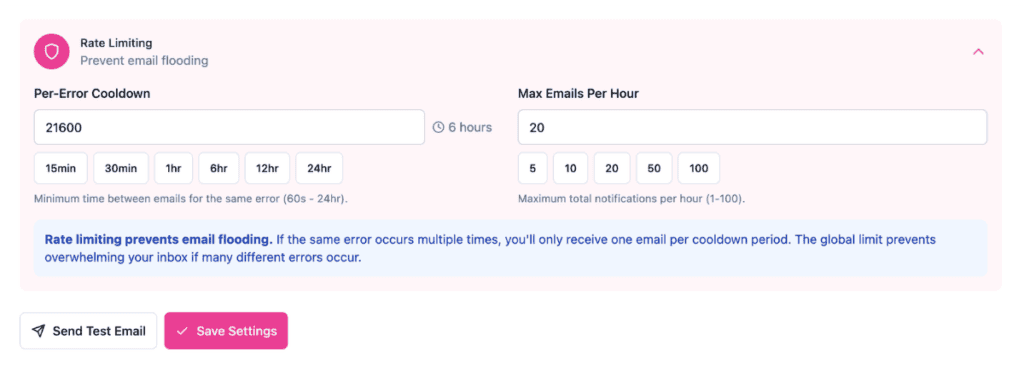
Available presets are 15min, 30min, 1hr, 6hr, 12hr, and 24hr.
Max Emails Per Hour is a hard ceiling on the total number of recorded sent entries WPDT logs in any 60-minute window. For fatal errors, one entry equals one email, and the ceiling is user-configurable. For non-fatal errors, WPDT may combine multiple error signatures into a single email, but each signature is recorded as a separate sent entry and counts toward the cap individually; the ceiling is fixed at five per hour regardless of this setting.
The cap exists to handle scenarios where many distinct error signatures each pass their individual cooldowns, but together would still generate an inbox flood.
When the cap is reached, WPDT records suppressed alerts in the Notification History with the status skipped_global_rate_limit. Available presets are 5, 10, 20, 50, and 100. The field accepts any value between 1 and 100.
When a crash affects multiple simultaneous visitors, multiple PHP processes can attempt to fire the same alert at the same moment. WPDT prevents this with two coordinated mechanisms: a WordPress database INSERT IGNORE to atomically claim the error for a single process, and flock() file locking as a fallback when the database is unavailable.
The locking system ensures that only one alert fires per error signature per rate-limit window, even under 50 concurrent requests. Every other process recognizes the existing claim and records the event as suppressed rather than firing its own notification.
✅ Key Guarantees
skipped_duplicate or skipped_global_rate_limit, so the log reflects the complete event picture, not only what reached your inbox.| Term / Constant / File | What It Means |
|---|---|
| Rate limit window | The time period during which WPDT suppresses repeat alerts for a given error signature. The duration is set internally by error type: one hour for fatal errors, 24 hours for warnings and all non-fatal types. The window resets after it expires, allowing the next occurrence to trigger a fresh notification. |
| Error signature | An MD5 hash generated from the normalized error message, PHP error type, source file path, and line number. Two crashes with different allocation sizes but the same source location share one signature. The same error, moved to a different line number, gets a new signature. |
| 7-day history store | A fixed rolling window. WPDT retains notification history entries for seven days and caps the store at 1,000 entries. The window is not user-configurable. Entries older than seven days are pruned automatically. |
notification-history.php | The file WPDT writes the notification history to, stored at wp-content/debug-toolkit/notification-history.php. Protected from direct HTTP access by a PHP die guard at the top of the file. |
| Per-Error Cooldown | The setting that controls the concurrent-request claiming window: how long WPDT holds an exclusive claim on an error signature so that only one PHP process fires the alert when the same crash affects multiple simultaneous visitors. The re-alert interval between notifications is set internally by error type and is not affected by this value. Presets: 15min, 30min, 1hr, 6hr, 12hr, 24hr. |
| Max Emails Per Hour | The hard ceiling on recorded sent entries logged in any 60-minute window. For fatal errors, one entry equals one email and the ceiling is user-configurable. For non-fatal errors, the ceiling is fixed at five entries per hour; multiple signatures may be combined into a single email, so the entry count and email count can differ. Presets: 5, 10, 20, 50, 100. |
| Smart Message Deduplication | The normalization step that strips stack traces, stack frame lines, memory allocation values, and file paths from error messages before hashing. This runs before the rate limiter, ensuring the cooldown window applies to the logical error rather than the literal message text. |
| History entry status | Each Notification History entry carries one of three status values: sent (the alert was delivered), skipped_duplicate (suppressed because the error signature’s cooldown window was active), or skipped_global_rate_limit (suppressed because Max Emails Per Hour was reached). |
Both rate-limiting thresholds are user-configurable. Navigate to WP Debug Toolkit › Settings › Notifications and open the Rate Limiting accordion to adjust either setting.
Step 1: Set the Per-Error Cooldown. Select one of the preset buttons: 15min, 30min, 1hr, 6hr, 12hr, or 24hr, or type a custom value in seconds into the field. This controls the concurrent-request claiming window, which is how long WPDT holds an exclusive claim on an error signature so that only one PHP process fires the alert when the same crash affects multiple simultaneous visitors.
The re-alert interval between notifications for the same error is set internally by error type: one hour for fatal errors, 24 hours for non-fatal errors, and is not affected by this value.
Step 2: Set Max Emails Per Hour. Select one of the preset buttons; 5, 10, 20, 50, or 100, or enter a custom value between 1 and 100. You should lower this value if alert volume remains difficult to manage.
Step 3: Save your settings. Click Save Settings to apply both changes.
Likely cause: Email notifications are disabled, or the MU-plugin (wpdebugtoolkit-notifications.php) is not installed, so WPDT is not evaluating errors for alerting and has nothing to record.
Fix: Navigate to WP Debug Toolkit › Settings › Notifications and confirm that the Email Notifications toggle is enabled and at least one error level is selected. If notifications appear enabled but the history remains empty, check the Must-Use Plugin section on the same page. If the status shows Not Installed (Optional), click Install MU-Plugin to install it. WPDT installs wpdebugtoolkit-notifications.php automatically in wp-content/mu-plugins/ when the MU-plugin is activated.
Likely cause: Multiple distinct error signatures from the same plugin are each passing their individual cooldowns, so each one generates its own alert even though they all originate from the same source.
Fix: Check the Notification History panel to see which error signatures are firing most frequently. Look at the error_type_string and file fields in recent entries to identify the pattern. If many different signatures are active, lower Max Emails Per Hour. Navigate to WP Debug Toolkit › Settings › Notifications › Rate Limiting to adjust it.
Yes. WPDT records every alert it evaluates, regardless of whether the notification was sent. Suppressed alerts appear in the Notification History panel with a status of skipped_duplicate (suppressed because the error signature’s cooldown window was active) or skipped_global_rate_limit (suppressed because the hourly cap was reached). The log gives you the complete picture of what occurred on your site, and not only what reached your inbox.
Go to the Notification History panel at the bottom of WP Debug Toolkit › Settings › Notifications. Each entry includes the error type, message, file, line number, timestamp, and status. An entry with status skipped_duplicate was suppressed because the same error signature fired again while its cooldown window was still active. An entry with status skipped_global_rate_limit was suppressed because Max Emails Per Hour was already reached for that hour.
Two errors can appear similar in your inbox but carry different error signatures if they originate from different source files or line numbers. WPDT’s error signature includes the file path and line number as well as the normalized message. If the same logical error appears in two locations in your codebase, WPDT generates two distinct signatures with independent cooldown windows. Check the file and line fields in the Notification History entries to confirm whether the alerts came from the same source location or different ones.
Email Notifications Overview – Understand how the MU-plugin, emergency memory protection, and Smart Message Deduplication work together as a system.
Setting Up Notifications – Go here to adjust the Per-Error Cooldown and Max Emails Per Hour thresholds covered in this article. Two settings, one screen.
Out of Memory Errors – See how repeated OOM crashes from the same source normalize to a single error signature, so a plugin leaking memory dozens of times per minute sends one alert, not dozens
